Multiplexing devcontainers with WezTerm
Using a multiplexer to connect to Docker devcontainers
September 25, 2025
Table of Contents
Devcontainers are a standardized way to define and run isolated development environments inside containers. They have become a common workflow for VS Code users through the Remote - Containers extension.
When using VS Code, the extension works by running a lightweight server inside the container. Your local VS Code instance connects to this server, giving you full access to the container's development environment while keeping your local editor setup intact. This means you can use your local themes, settings, and extensions while seamlessly working with the container’s tools and dependencies.
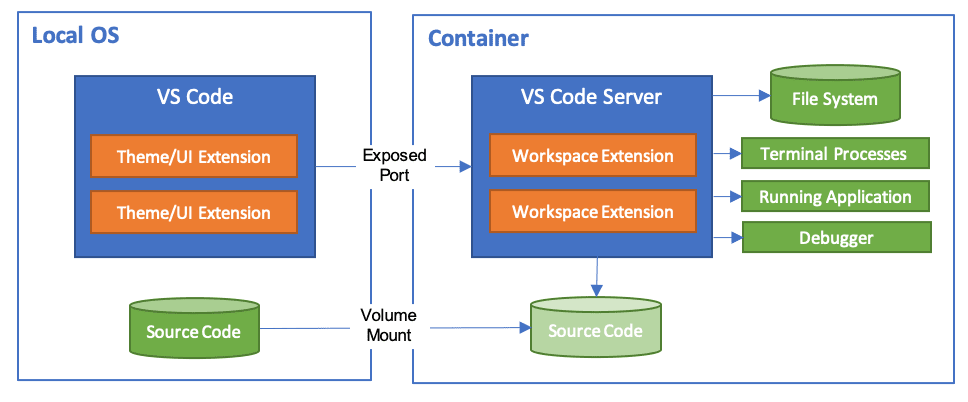
See the official VS Code documentation for more details: Developing inside a Container.
This workflow strikes a good balance between convenience and isolation: your editor stays local, but the runtime environment lives in the container.
The problem
However, I use Neovim btw ™
If you're a Neovim user then the same workflow is not available. Neovim does not have a concept of running as a “remote server” in the same way.
The typical approach is to SSH into the container and launch Neovim inside it. While functional, this introduces some issues:
- Performance: SSH redraw can be slow, especially with plugins that use virtual text or render additional panels.
- Visual artifacts: depending on your plugin setup, you may see screen tearing or glitches.
- Latency: editing generally feels less responsive.
In practice, I've found this approach too slow and distracting for daily use.
The solution
The closest analogue I've found to VS Code’s experience for Neovim users is through WezTerm.
WezTerm includes a multiplexing feature that allows you to run a WezTerm daemon inside a container and connect to it from your local WezTerm using an SSH domain. Your local WezTerm connects to the remote daemon, avoiding the usual redraw problems.
See the official documentation here: WezTerm Multiplexing.
In practice, this feels significantly faster than working through raw SSH. You retain the benefits of a containerized development environment while keeping a local editing experience.
WezTerm domains
- Create your
devcontainer.jsonas usual. - Install WezTerm inside your base container image. In my setup, I maintain a prebuilt base image that installs WezTerm nightly in the Dockerfile. This base image is pushed to GHCR and reused for all project containers. Here’s the base image.
- In your WezTerm config, define the domains that point to your devcontainers.
Example from the WezTerm docs:
config.ssh_domains = {
  {
    -- This name identifies the domain
    name = 'my.server',
    -- The hostname or address to connect to. Will be used to match settings
    -- from your ssh config file
    remote_address = '192.168.1.1',
    -- The username to use on the remote host
    username = 'wez',
  },
}
To connect:
wezterm connect my.server
Example WezTerm workflow
If you frequently spin up new devcontainers, manually updating the WezTerm config with container names and IPs quickly becomes tedious.
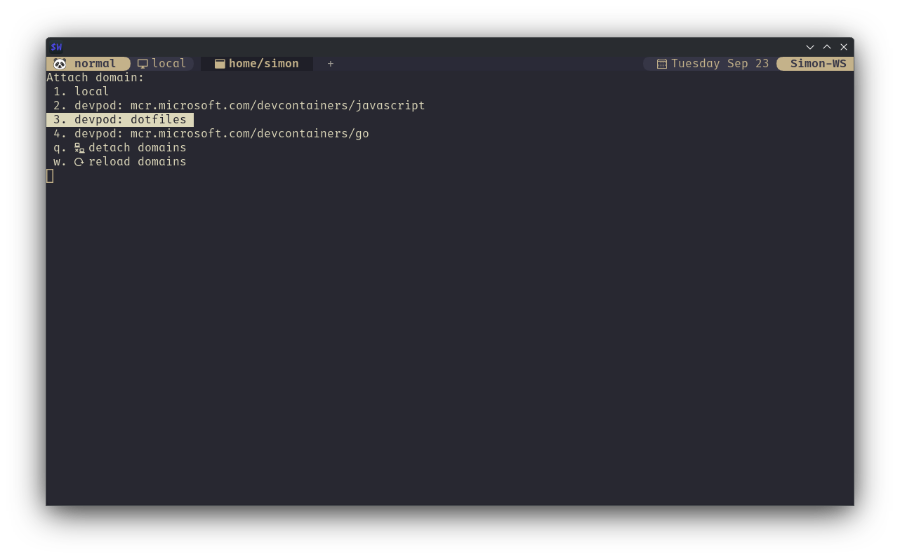
To address this, I came up with a workflow that dynamically discovers running containers, extracts their relevant information, and builds WezTerm SSH domains on the fly. I also added a selection menu triggered by a keybinding so I can quickly pick which container to connect to.
Hopefully you'll get the general idea of how this works from the code below. This is not meant to be a step-by-step tutorial as your personal setup might differ quite a lot from mine.
First, here’s how I get container IDs from Docker:
M.get_container_ids = function()
 local container_ids = {}
 local cmd = "docker container ls --format '{{.ID}}'"
 local handle = io.popen(cmd)
 if handle then
  for line in handle:lines() do
   table.insert(container_ids, line)
  end
  handle:close()
 end
 return container_ids
end
In my case I use devpod to create containers, so I inspect each container to extract workspace names, IPs, and ports:
M.devpods = {}
M.get_devpod_info = function()
 local ids = M.get_container_ids()
 local devpods = {}

 for _, id in ipairs(ids) do
  local cmd = string.format(
   "docker inspect -f '{{.Name}} {{range .NetworkSettings.Networks}}{{.IPAddress}}{{end}} {{.Config.Image}} {{.State.Status}} {{.Config.User}} {{range $p, $conf := .NetworkSettings.Ports}}{{$p}}->{{if $conf}}{{(index $conf 0).HostPort}}{{end}} {{end}}' %s",
   id
  )
  local handle = io.popen(cmd)
  if handle then
   local line = handle:read("*l")
   handle:close()
   if line then
    local name, ip, image, state, user, ports =
     line:match("^/(%S+)%s+(%S+)%s+(%S+)%s+(%S+)%s+(%S*)%s*(.*)$")
    if name and image and ports then
     local workspace = M.extract_workspace_name(image)
     local port_map = M.map_ports(ports)
     devpods[name] = {
      ip = ip,
      image = image,
      workspace = workspace,
      state = state,
      user = user ~= "" and user or nil,
      ports = port_map,
     }
    end
   end
  end
 end
 return devpods
end
Helper functions handle port mapping and workspace extraction:
M.map_ports = function(ports)
 local port_map = {}
 if ports and ports ~= "" then
  for container_port, host_port in ports:gmatch("(%S+)->(%S+)") do
   port_map[container_port] = host_port
  end
 end
 return port_map
end

M.extract_workspace_name = function(image)
 local workspace = image:match("^([^:]+)")
 if workspace then
  workspace = workspace:match("^(.*)%-.+$") or workspace
 end
 return workspace
end
From this data, I generate WezTerm SSH domain definitions:
M.ssh_domains = {}
M.create_ssh_domains = function()
 if next(M.ssh_domains) ~= nil then
  return M.ssh_domains
 end

 if next(M.devpods) == nil then
  M.devpods = M.get_devpod_info()
 end

 for name, data in pairs(M.devpods) do
  table.insert(M.ssh_domains, {
   name = data.workspace or name,
   remote_address = string.format("127.0.0.1:%s", data.ports["2222/tcp"]),
   username = data.user or "vscode",
   connect_automatically = false,
   multiplexing = "WezTerm",
   remote_wezterm_path = "/usr/bin/wezterm",
   ssh_option = {
    identityfile = "~/.ssh/id_devcontainer",
    forwardagent = "yes",
   },
  })
 end
 return M.ssh_domains
end
Finally, I add a simple selector to pick containers interactively, and bind it to a key.
 {
  key = "p",
  mods = "SUPER",
  action = wezterm.action_callback(function(window, pane)
   window:perform_action(show_domain_selector(), pane)
  end),
 },
This creates a smooth workflow: press a key, choose a container, and connect.
Solutions to common gotchas
While not specific to WezTerm multiplexing, here are a few devcontainer tips that can make your setup smoother:
Reuse SSH keys: bind mount your host’s SSH_AUTH_SOCK into the container.
{
  "mounts": [
    "type=bind,source=${env:SSH_AUTH_SOCK},target=/home/vscode/.ssh/ssh-agent"
  ],
  "remoteEnv": {
    "SSH_AUTH_SOCK": "/home/vscode/.ssh/ssh-agent"
  }
}
Clipboard integration on Linux: mount your X11 display socket to get tools like xclip to work. Similar ideas exist for Wayland, but that is a surprisingly complicated topic.
{
  "mounts": ["source=/tmp/.X11-unix,target=/tmp/.X11-unix,type=bind"]
}
Keep dotfiles updated: use postStartCommand to pull the latest version.
{
  "postStartCommand": "cd ~/dotfiles && git pull --ff-only"
}
Timezone configuration: explicitly set the timezone inside the container. This solved a whole host of small problems.
{
  "remoteEnv": {
    "TZ": "America/Vancouver"
  }
}
Closing thoughts
This approach bridges the gap between Neovim workflows and containerized development. By using WezTerm multiplexing, you get a fast, responsive editing experience while still isolating your environments in devcontainers.
I would love to see someone flesh out some of these ideas in the form of a WezTerm plugin or Neovim package. Until then, scripts like these are the closest I've found to a smooth devcontainer editing experience outside of VS Code.